

Grandstream GXP1610
£37.99
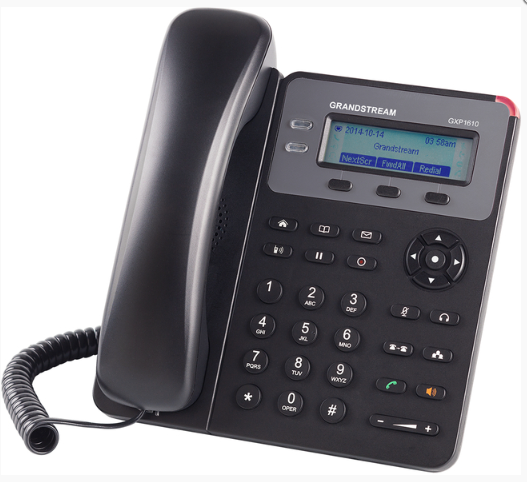
Category=Voip Phone, Condition=New, VAT 20% included = GB 491 6633 66
Cheapest Voip Phone so No Backlight but OK in well lit office, not good enough for home use as tested by us. No POE, but includes a power supply. HD sound quality. Wall mountable, RJ9 headset jack, 3-way voice conferencing, Record, Page and Voicemail buttons. Free Provisioning and volume Discounts, Contact us 1st. Tested by us with FreePBX Voip Server with unlimited extensions. Landline business number on your mobile so you don't have to answer calls to your mobile number. see also Use-Tab videos. Free Provisioning and volume Discounts. Contact us 1st..
For Best Value Voip Phones, Cable-free wifi Phone, cheap Door Intercoms, and some POE ports, goto Products(home).
Shipping & Returns UK only: 0-1day (if not Provisioned) In Stock, Unlimited because New. Lead times may apply, you will be notified, or contact us 1st.
Datasheet shows product compliance certifications. Open selected phone image above in new tab to zoom in. Warranty 1 year unless otherwise stated.
.
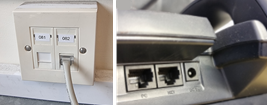
Some FreePBX features. Our other web page with more about Voip Phones and FreePBX https://voip.bookbuddi.com
Dial Numbers: 
Dial 2nn for extensions, press L1 button to ring on speaker (see Video), else lift handset to ring in Handset or green send button. UK numbers: just dial number, international: dial 0044 for UK etc. Answer with Flashing L1 or Lift or Green Send. Mobile extension numbers start with 5nn instead of 2, don’t dial directly unless no local number, as no voicemail set and call will be forwarded there via Follow Me settings, voicemail will be left on local number.
End call by replace handset or screen prompt or speaker button orange.
Dial numbers from your PC via Phonerlite app and its contacts, needs USB headset and can use same 2nn extension number you use. Dial numbers from Mobile phone app, Zoiper, set as 5nn extesion. Zoiper can use phone contacts, if dial from history, may have to edit number before dial and remove +. Dial numbers from Web UCP (see below) Add Contact group to store your contacts. Add Contact. Click on contact. Move mouse to phone number, it turns into a link, click on it. Press Initiate then Originate button. Your phone will ring, Answer it, it will then make a call for you. System login, search Contact Manager to edit system contacts.
Voicemail: 
Get notification from email or flashing corner. Will get Voicemail from no answer, or call Reject via display button.
Dial *98 or use your configured voicemail button.
Will hear camedian mail, mailbox, then enter your extension number. It is also your initial username and password. You can press # if asks for Pound Key. From outside, dial 020 nnnn nnnn, enter extension *98, then your extension and password when you hear the mailbox prompts. After listening to message auto saved to old folder, message light stop flash as nothing inside inbox.
Web UCP(User Control Panel): https://ucp.mydomain.com User=extension number, password=reset password. Check welcome/voicemail email (junk folder, make not junk?). Ask server Admin to resend it if required. Web link for online voicemail to hear and delete there, instead of on phone. Save to local computer, then delete, as they are not private to Server Admin (passwords are private), and they will be deleted when server full. Set Web UCP Follow me to mobile extension if available, set Ring First to 0 seconds if out of office, so mobile will ring quickly.
Transfer: (forward) 

Blind: Answer call on L1, press Transfer, dial extension, Transfer Again and Hangup.
Attended: Answer call and select L2 to put call on hold, dial extension, press Transfer to warn person, then Transfer again and L1 (shows transfer on display)
else select L1 to talk to caller again (select the flashing Line calls) then EndCalls without 2nd Transfer.
Pickup calls:
Dial ** followed by the extension e.g if a call is ringing on extension 103 the extension 101 can pick it up by dialling **103
Missed calls:
See via menu and arrow keys, select and dial back via OK(button)
DND:
DND (do not disturb): calls straight to voicemail, like when you press the Reject Button, Can also set ring volume low, so don't have to answer. Voicemail light will flash if get voicemail.
Conference Call: 
Dial the number or extension as set by your Web UCP host or Conference call 3 people via your Grandstream phone. Dial 1st number and connect, Press conference button and dial 2nd number, and connect with green send button (1st on hold) connect all via ConfCall on display menu. Record if want.
Call Recording: 
Start/Stop via the configured recording button on your phone. Get the recordings from your call log via your Web UCP
Follow Me:
Configure via Web UCP to allow your main phone to ring, then mobile extension (if no answer) then voicemail.
.
 Setup & Installation
Q: What’s the best way to connect the GXP1610? A: Use an Ethernet cable to connect the phone to your router (POE not supported) via a wall mount socket. This ensures optimal call quality and reliability.
Q: What if I only have one Ethernet port at my desk? A: The GXP1610 supports Ethernet passthrough, allowing you to connect both your phone and PC using a single Ethernet connection.
Q: Does the phone support auto provisioning? A: Yes, it supports auto provisioning with Grandstream’s UCM series of IP PBXs.
Q: How do I mount the phone? A: The phone also supports wall mounting.
.
 Compatibility
Q: What features enhance usability? A: The phone includes:
3 speed dial keysHD speaker phone
Electronic Hook Switch (EHS) support for Plantronics
Q: Is the display backlit? A: No.
Q: Can I use this phone with any VoIP system? A: The GXP1610 is compatible with most SIP-based VoIP systems. For specific configuration needs, contact BookBUDDI before ordering.
.
 Warranty & Support
Q: What warranty is included? A: BookBUDDI offers warranty coverage as outlined in their product support and warranty terms. For specific duration and conditions, refer to the “About” section in the site menu.
Q: Can I get help with installation or setup? A: Yes. You’re encouraged to contact BookBUDDI directly to discuss your requirements or request a free demo.
Q: What if I need to return or exchange the product? A: Returns and exchanges are subject to BookBUDDI’s terms and privacy policies, on the About page.